Hier sind die Vor- und Nachteile des Navigator-Clients: **Vorteile:** * **Benutzerfreundlichkeit:** Oftmals als intuitiv und einfach zu bedienen beschrieben, mit einer klaren Benutzeroberfläche. * **Gute Performance:** Kann eine reaktionsschnelle und schnelle Datenverarbeitung und Navigation ermöglichen. * **Funktionsumfang:** Bietet in der Regel eine breite Palette an Funktionen für die Datenanalyse, -bearbeitung und -visualisierung. * **Integration:** Lässt sich oft gut in bestehende IT-Landschaften und andere Softwarelösungen integrieren. * **Anpassbarkeit:** Ermöglicht häufig eine gewisse Personalisierung und Anpassung an spezifische Bedürfnisse. * **Zuverlässigkeit:** Gilt als stabiles und zuverlässiges Werkzeug, das auch bei intensiver Nutzung gut funktioniert. **Nachteile:** * **Hohe Kosten:** Die Anschaffungs- und Lizenzkosten können beträchtlich sein, was es für kleinere Unternehmen oder Einzelpersonen weniger zugänglich macht. * **Komplexität für Fortgeschrittene:** Während die grundlegende Bedienung einfach ist, kann die volle Ausnutzung aller fortgeschrittenen Funktionen eine Einarbeitungszeit erfordern. * **Ressourcenbedarf:** Kann je nach Komplexität der Daten und der durchgeführten Operationen einen höheren Hardware-Ressourcenbedarf (Prozessor, Arbeitsspeicher) haben. * **Abhängigkeit vom Anbieter:** Man ist an den jeweiligen Anbieter und dessen Roadmap gebunden, was bei Änderungen der Unternehmensstrategie des Anbieters zu Problemen führen kann. * **Spezifische Anwendungsfälle:** Möglicherweise ist er am besten für bestimmte Branchen oder Datentypen geeignet und weniger flexibel für völlig andere Anwendungsbereiche. * **Schwierigkeit bei der Deinstallation/Umstellung:** Manchmal kann die vollständige Entfernung oder die Umstellung auf eine alternative Lösung aufwändig sein.
Many manufacturers offer a user interface for operating their DCIM software, which can be accessed via any standard web browser. This saves the cost of an additional tool and is quickly available. However, anyone who takes a closer look at the workflows involved in managing IT and data centres will be overwhelmed by their complexity and variety. Therefore, at the request of many customers, we have developed an additional front-end using Java, which offers almost unlimited possibilities for automated and validated workflows.
Studies show that users find graphical interfaces easier to work with than clicking through menu hierarchies. Modern applications and operating systems use a multi-window technique that allows different views and editing modes to be organised in independent areas and switched on and off as needed. This generally provides users with far more functions from which they can choose depending on the situation.

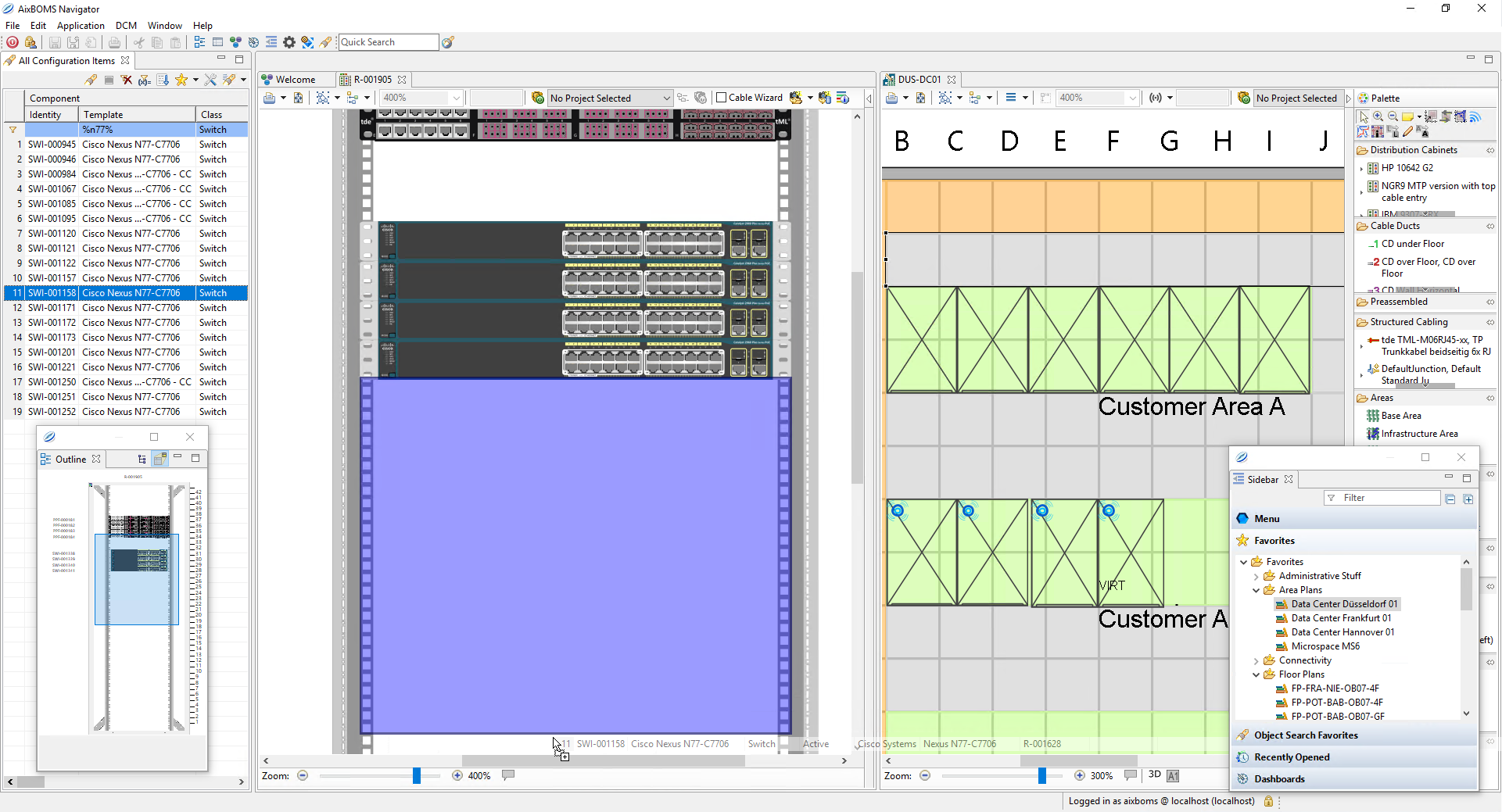
These are also the basic characteristics of our Java client, which we AixBOMS Navigator They are called editors. Where it makes sense, interesting information is presented graphically. We call these editors because administrative operations can be performed in them, just like in a graphic editor. There are context menus that offer currently available functions when you click on a graphical object. Which ones are available is determined by "business rules" that take into account the object type and its properties, as well as the rights and scope of duties of the current user. This way, you cannot assign an IP address to a cable or a Windows 7 application to a printer.
Naturally, drag and drop operations can also be performed in the editors. These are suitable when you want to create and position new objects or define relationships between them. These can include, for example, parent-child and containment relationships, or also physical connections.
All operations that you perform in the editors affect the corresponding database contents one-to-one. This allows you, for example, to perform relocation actions quickly and easily via drag and drop, automatically updating the information for all involved objects at a single stroke. Not to be forgotten are the often non-trivial relationship information.
Our navigator also supports multi-window technology. You can display interesting information in graphics, lists, etc. in any number of independent areas. You can scale windows, undock individual windows and: you can also perform drag-and-drop operations between individual windows. What these are and what they do, again, depends on the context and the respective object types. We align ourselves with the wishes of our customers, who manage their IT and data centres with AixBOMS on a daily basis.
For example, you can select a server from a range of IT components using selection lists and filters, drag and drop it from the results list into a RackView window, and release it precisely where it is to be installed. RackView automatically generates all the necessary work orders, which can then be viewed and edited in a separate window. Here too, business rules secure all processes in the background, checking, for instance, if there is enough space for this rack and if the power and climate conditions are sufficient. If a switch had been installed instead of the server, it could now be provided with the necessary connections via mouse operations.
Our navigator offers advantages that web browsers cannot support. However, we still provide a free web client with many graphical views, though they do not possess the full intelligence of the editors in the navigator. Additionally, a range of links and context menus are available. Positioning and embedding components can only be done through menus.